Creating Site Stock Lists |
  
|
Creating Site Stock Lists |
|
Once you have created the main stock list, you may copy all or part of the list to each site. This allows only certain stock items to be ordered for a Site. Go to Clients > B. Maintain Sites > Stock List.
If you wish to load all items click on the ‘Load Items’ button and set the parameters as below (bearing in mind your start and end stock codes will be your own):
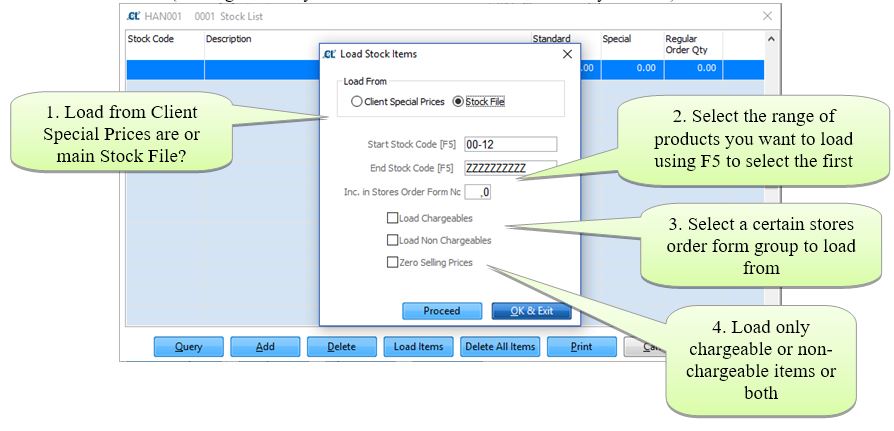
As you can see above you can choose to load only chargeable or non-chargeable items or both. Warning: If the Zero Selling Prices box is ticked then all items will be loaded onto that site with a sale price of 0.00.
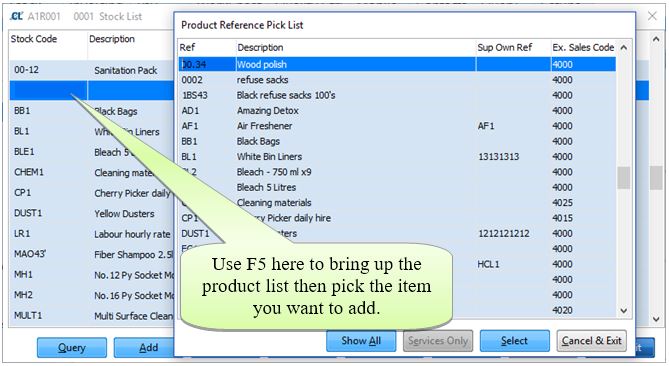
Alternatively, you can load individual items from the main stock list by pressing F5 when in the stock code box and selecting the item you want to load as below:
Once the site stock list is in place you may want to amend the price to a special price for that site, which you can do by changing the sale price under the ‘Special’ column as below:
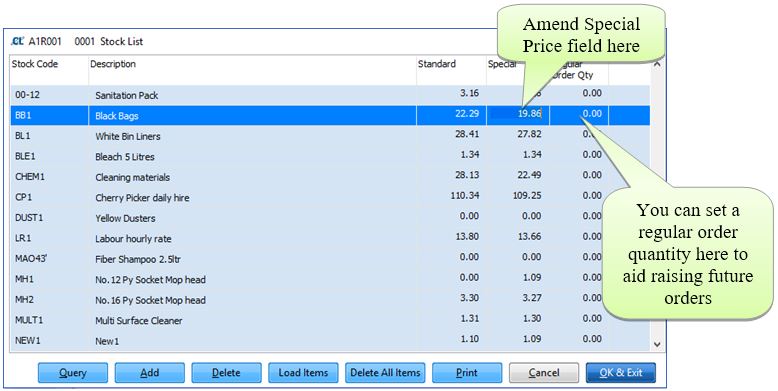
If an order for BB1 Black Bags were placed for this site, the charge would be £19.12 instead of £20.00, without the user having to intervene or remember the special price to be charged.