Customer Service Review Form |
  
|
Customer Service Review Form |
|
CleanLink Site Manager includes a pre-populated set of questions for Service Reviews. These can be amended as required to suit your company's procedure for Customer Service Reviews:
Select Mobile > R. Send Forms (Setups_Send) and then Question under the Customer Service Reviews section
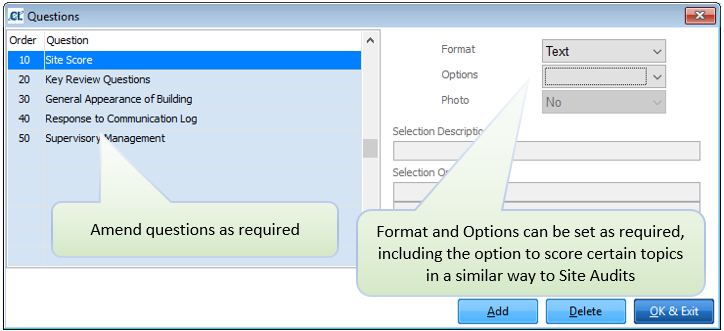
Under the Format section there are the following options which affect the response on the device:
Text: Allows the entry of free format text.
Header: Used to separate groups of questions. No input is required
Comment: Use this to capture a comment to give more information
Score: Allows entry of a score between 1 and 5
Date: Allows the entry of a date
Y/N: Provides the option to select a radio button (selecting turns it green, meaning yes)
Selection: Allows one of up to 5 options to be selected as the answer
Signature: Creates a signature box for providing a signature
Under the Options section there are the following options:
Bold: Question is displayed in bold font
None: No option selected
Required: details must be entered before the form can be completed and transmitted.
If a question has Selection as the format, you must enter the Selection Description. If you have selected Selection as the question format, you can add up to 5 Selection Options.
Once you have completed configuring the form, Click OK & Exit and then . If you want all active devices to receive the new form, then click Yes, Proceed. All devices will then receive the updated form when they are next synchronised. If you only want specific devices to receive the updated forms, click OK & Exit > A. Select Mobile for export, select a mobile device, select Q. New Forms (Setups_Send) > Yes, Proceed button.